


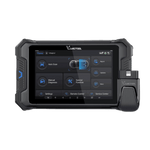


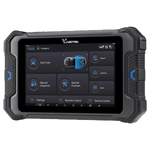


Elevate your Diagnose experience with the VD80BT
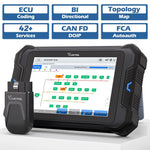
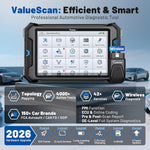
Smarter diagnostics, broader coverage, and unbeatable value beyond $1,000+ tools. The VD80BT professional OBD2 scanner delivers 4000+ active tests, 42+ hot services, advanced ECU coding, PMI, and V.A.G Guided Functions, key programming combined with OE-level full system diagnostics and intelligent topology mapping to reduce diagnostic time by up to 50%. Supporting FCA AutoAuth, CAN FD, and DoIP, it covers 10,000+ vehicle models worldwide. Powered by Android 10, a quad-core 1.5GHz processor, 4GB RAM + 64GB storage, an 8-inch 1280×800 HD display, 5000mAh (7.3V) battery, Type-C fast charging, and a 33–66ft stable wireless connection, the VD80BT is built for pros and serious DIYers who demand speed, depth, and reliability.
Unlock Full OBD2 Capabilities
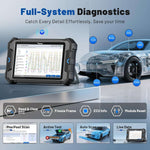
The VD80 BT car diagnostic tool delivers complete OBD2 functionality, supporting all 10 OBD2 modes. From reading and clearing fault codes to live data streaming, O2 monitoring test, and advanced ECU diagnostics, it provides accurate, real-time insights into your vehicle’s performance and health.
Wireless Bi-Directional Control, Faster Active Testing
The VD80BT bidirectional scan tool delivers 4000+ active tests, including throttle reset, window calibration, solenoid checks, and more—allowing technicians to directly control vehicle components and quickly verify repairs. With a fully wireless connection, it frees you from the limits of wired diagnostic tools, enabling stable, high-speed bi-directional control within a 33–66ft range. Actively operate components such as the A/C clutch, fuel injectors, ABS pump, and radiator fan, while monitoring real-time data for faster, smarter, and more efficient diagnostics in any workshop environment.
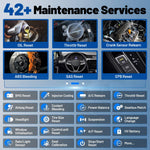
42+ Hot Service Functions for Expert-Level Repairs
The VD80BT car diagnostic scanner supports 42+ hot service functions across 80+ vehicle brands, covering everything from basic resets to advanced maintenance such as Crank Sensor Relearn, Injector Coding, ABS Bleeding, Oil Reset, Throttle Relearn, EPB, BMS Reset, and Tire Size Reset. It also offers 100+ vehicle-specific functions including TPMS, SAS, VIN Write, Brake Fluid Replacement, Fuel Trim Reset, and ABS Initialization, delivering true shop-level precision at a fraction of the cost. Stop paying high service fees—handle maintenance yourself with confidence.
Note: Functions vary by vehicle model. Please send your VIN to confirm compatibility before purchase.
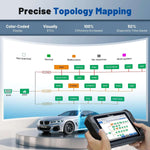
Intuitive Vehicle Topology Mapping for Faster Diagnostics
The VD80BT car diagnostic scanner features an advanced Topology Map—a premium function usually found in $1,000+ OBD scanners. With just one tap, it performs a full system scan and displays all modules and DTCs in a clear, color-coded layout, helping boost diagnostic efficiency by up to 200%. It also visualizes complex vehicle networks such as K-CAN2, PT-CAN, and FlexRay, instantly identifying faulty modules, hidden connections, or communication breakdowns. Whether you’re a professional aiming to save time or a beginner learning diagnostics, this OBD2 scanner makes fault-finding faster, smarter, and more intuitive.
Note: Functions vary by vehicle model. Please check compatibility before purchase.
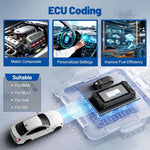
Advanced ECU Coding + PMI
Stop wasting time on complex coding procedures. The VD80BT supports advanced ECU Coding for BMW, VW, Audi, Benz, and more, allowing you to quickly adapt new ECUs, customize vehicle settings, and optimize performance with ease. Its PMI (Programmable Module Installation) function streamlines module replacement for Ford, Lincoln, and Mazda by automatically transferring programming data, reducing setup time and minimizing errors. Enjoy greater efficiency, accuracy, and control to elevate your diagnostic and programming workflow.
Important Note: Functions vary by vehicle model and configuration. Please send your VIN before purchase to confirm compatibility.

Discover More VD80BT Advanced Features
The VD80 BT features an 8-in-1 data stream that delivers real-time, multi-channel analysis for faster and more efficient diagnostics. Its Auto Scan function generates instant system-wide reports, while the one-touch vehicle health check saves valuable time. Confidently tackle complex VAG group vehicles with support for coding, adaptation, and module reset guidance. With CAN FD, DoIP, and FCA protocols, the device ensures lightning-fast communication and broad compatibility across a wide range of vehicles.
Universal Vehicle Coverage, Multi-Language Support
The VD80BT OBD2 scanner delivers future-proof diagnostics with support for 150+ vehicle brands and 10,000+ models worldwide. Fully compatible with CAN FD (GM, Cadillac, Buick) and DoIP (BMW, Land Rover, Jaguar), it also supports FCA AutoAuth for smooth diagnostics on Jeep, Dodge, and Chrysler vehicles. Designed for global use, this automotive scanner supports 22 languages, including Spanish, making it ideal for international repair shops and DIY users alike. Enjoy fast, accurate, lab-grade diagnostics—anywhere, without language barriers.
Note: Vehicle coverage varies by model. Please send your VIN to confirm compatibility before purchase.

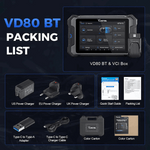
VD80BT Packing List & 2-Year Warranty
VD80 BT Diagnostic Scanner*1, VCI Box*1, US Power Charger*1, EU Power Charger*1, UK Power Charger*1, Type-C to Type-A Adapter*1, Type-C to Type-C Charger Cable*1, Quick Start Guide*1, Packing List*1, Hard Case*1, Color Carton*1.
Keep Explore

FAQs-VD80BT
To change the menu language, please send the S/N of the diagnostic tool to our support team via and get Spanish software program authorization. When the authorization is done, go to Settings on the diagnostic menu- language- Spanish tochange the language of the android tablet into Spanish, then go to Updates-download all software programs. When all software programs in Spanish have been downloaded and installed, you may use the diagnostic tool in Spanish.
After three years of free updates, the software on the device can still be used as long as it is not corrupted. But if you want to fix bugs in the current software, keep the tool covering newer functions or car models, or perform other online functions, you'll need to buy a subscription for it. The annual subscription fee for VD80BT is 199 USD, which is less than what other brands charge.
Regarding your question about the “+” in the special functions count: the “+” indicates that the device’s functions are divided into Special Functions (Inside) and Special Functions (Outside).
Special Functions (Outside) refer to the 41 functions listed under the Special Functions menu.
Special Functions (Inside) refer to the functions available when you enter a specific vehicle model, which vary depending on the car.
That is why we promote the device as having 41+ special functions.
Please enter Manual Diagnosis > Select America/Europe/Asia > Click the "OBDII" icon on the top left of the screen > Auto Scan/Select OBDII Protocol > I/M Readiness.
This is not a correct understanding. The VCI Wi-Fi is different from the home Wi-Fi. While connected to the VCI, you can also connect to the home Wi-Fi to perform software upgrades, etc.
Wi-Fi wireless connection is the type of communication from the VCI to the machine and has nothing to do with the Wi-Fi internet connection.
This problem could reside with the setting of your router firewall or the network provider in your region that restricts access to the server, please check if your router firewall can access the server or not. If the problem still exists, please reach us via service@vdiagtool.com.
We currently do not sell an endoscope specifically for the VD80BT. However, most Type-C endoscopes available on the market are compatible with the device, so you can easily purchase one online.
RECENTLY VIEWED PRODUCTS