







Unlock Professional-Level Diagnostics with the VdiagTool VD70
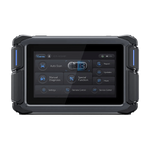
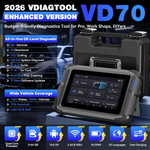
Latest VD70 Car Scanner is designed by professionals for automotive technicians, workshops, and DIY enthusiasts. It features OE All Systems Diagnostics, 39+ Maintenance Services, Bi-Directional Control, and ECU Coding, etc. Supporting CAN FD & DoIP, with 2+64GB storage, an 18.25Wh battery, and 3 years of free updates, it’s built for both immediate and long-term use, offering dependable support for a wide range of vehicle maintenance tasks.
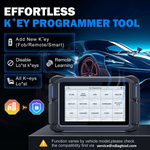
Professional IMMO & Key Programming
The VD70 automotive scanner with IMMO/key programming functionality can disable lost vehicle keys and program replacement key fobs. It supports programming single or multiple new keys, reading and calculating PIN codes, checking the number of existing keys, generating new keys, adding keys, and handling situations where all keys are lost.
39+ Services for Comprehensive Repairs
The VD70 OBD2 scanner offers 39+ services, including Oil Reset, EPB, BMS, Throttle Adaptation, Injector Coding, ABS Bleed, Crank Sensor Relearn and TPMS Reset. It also provides vehicle-specific functions include reset, adaptation, initialization, and calibration. These capabilities help you perform comprehensive tasks like system reset with ease.
Note: Services vary by vehicle make, model, and year. Please check compatibility with your VIN by contacting us at service@vdiagtool.com before purchase.
Comprehensive Bidirectional Controls & Active Tests
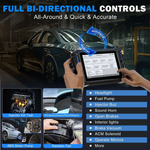
With the VD70, you get a full bidirectional scan tool capable of performing 4000+ active tests. It can command car modules and receive data from the ECU to test components like EVAP, ABS pumps, windows, and more—all with one tool. This helps you pinpoint faults accurately, saving time and money by reducing trips to the shop and the need for multiple scanners. Whether you're a pro or a DIYer, this diagnostic tool simplifies complex diagnostics.
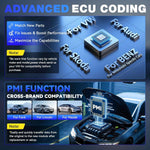
Advanced ECU Coding & PMI for Specific Brands
This auto diagnostic scanner supports advanced ECU coding for specific european vehicles for VW, for Audi, for Skoda, for Mercedes-Benz, for Mitsubishi. It also enables ecu coding for BMW, for Volkswagen, for Jaguar, and for Land Rover. From coding and component matching to adaptive data resets, this scan tool helps you match new components after repairs or replacements to boost performance.
Note: ECU coding functionality varies by vehicle and module, please check the compatibility before order.
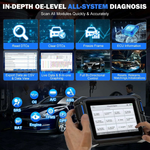
OE-Level Full System Diagnostics
With full system diagnostics, the VD70 automotive diagnostic scanner covers essential vehicle systems such as Engine, Transmission, ABS, Airbags, Brake, Chassis, and more. Features include fault code reading/clearing, 8-in-1 live data graph/text, freeze frame retrieval, ECU info checks, active tests, bidirectional controls, and special functions, providing precise dealership-level diagnostics effortlessly.

8-In-One Data Graphing
Enables live data streaming with up to 8-in-one graphing, simplifying focus on specific or suspicious parameters. You can export data as CSV, record/playback data, view freeze-frame data, and perform active tests and services-all with one car computer diagnostic tool. This comprehensive analysis helps pinpoint issues quickly, leading to more accurate repairs.

FCA AutoAuth & CAN FD/DoIP for Faster Vehicle Communication
Support for the FCA SGW module for Chrysler (2018+), and other compatible models ensures this obd scanner is ready for modern vehicles. The VD70 also supports CAN FD for GM MY2020+ and DoIP for BMW E/F/G Chassis, for Jaguar, and for Land Rover, providing up to three times faster communication for a wider range of vehicles—without the need for special adapters. This eliminates the cost of additional equipment, saving you over $200 on adapters.
Work for 85+ Car Makes, 150+ Brands, Covered 10,000+ Cars
This VdiagTool all-in-one scanner is specially designed for large maintenance shops, workshops, car dealers, and auto mechanics. It works with 12V petrol sedans, SUVs, minivans, and light-duty trucks worldwide, including:
➤Europe Cars: DEMO, VW, MINI, LANDROVER, SEAT, FERRARI, FORD, OPEL, ALFA, ROMEO, VOLVO, ABARTH, SMART, BMW, FIAT, LANCIA, RENAULT, ASTON MARTIN, GAZ, MASERATI, MERCEDES, UAZ, SKODA, CITROEN, DACIA, AUDI, JAGUAR, PORSCHE, PEUGEOT
➤Russian Cars: ZAZ, IZH, PAZ, UAZ, VAZ, GAZ, Lada....
➤America Cars: DEMO, GM, FORD, CADILLAC, CHEVROLET, GMC, HUMMER, JEEP, SATURN, PONTIAC, LINCOLN, DODGE, CHRYSLER, BUICK
➤Asia Cars: Demo, TOYOTA -LEXUS, ISUZU, MAZDA, KIA, INFINITI, ACURA, NISSAN, RENAILTSAM, HYUNDAI, HYUNDAI, HONDA, SUBARU, SUZUKI, MITSUBISHI, SSANGYONG
➤Australia Cars: Demo, Ford, Honda
➤Brazilian Cars: FIAT of Brazilian, GM of Brazilian
➤China Cars: DEMO, JAC, CHERY, GEELY, GREAT WALL, BYD, LIFAN
Support 23 Languages: Arabic, English, Chinese (Traditional), Danish, German, Greek, Spanish, Persian, Finnish, French, Hungarian, Italian, Japanese, Korean, Dutch, Norwegian, Polish, Portuguese, Russian, Swedish, Thai, Turkish, Vietnamese.

VdiagTool VD70 Full Package List & 2-Year Warranty
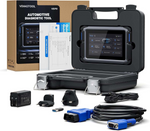
VD70 Diagnostic Tool *1, Type-C to Type-A Cable *1, Type-C to Type-C Cable *1, Charger (US Plug) *1, Charger (EU Plug) *1, Charger (UK Plug) *1, OBD15 Main Cable *1, Quick Start Guide *1, Packing List *1, Hard Case *1, Color Carton *1.
FAQs-VD70
No, it doesn't need an Internet connection all the time. You just need to register it and download the updates with internet connection. For some special vehicles like Peugeot, scan tools need to be connected to the Internet, because it is required by the manufacturer. It will require internet connection when you are doing some advanced features like Key Programming(some).
No, you don't need connect your device to the Internet/ Wi-Fi when you are in the trial mode.
All our tools are comprehensive diagnostic tools that can work on many vehicle brands, but it cannot do all the functions on all vehicles, just like any other scan tools in the market, even the factory scanner can only do functions on their own brand. Because not all vehicles come with the same functions when manufactured and even the vehicles of the same model might have various configurations.
Click the link below to view or download the user manual: VD70 Product Manual
The free subscription period is 3 years. After it expires, you can still continue to use all the applications and updates you received during the subscription period, and this will not affect their normal use.
Yes, VD70 supports key programming, it is a reliable key programming tool offering functions like reading Pin code, adding new keys(Fob/Remote/Smart), remote learning, etc. These functions vary by model, please provide VIN via service@vdiagtool.com directly, and we will reply to you after confirming your vehicle compatibility.
Regarding the device not charging issue, please charge for more than one hour first, unplug the charger, press and hold the power button for 15 seconds, and check if it turns on. Also, please confirm whether the device screen will light up when charging, and try to press and hold the power button for more than 10 seconds to try several times while charging.
This issue is usually caused either by the USB cable or by the file transfer mode not being selected correctly on the device. Could you kindly try the following steps using a different USB-C cable?
- Connect the Diagnostic Tool to your PC through a Type-C cable (one end into the Type-C port on the device, the other end into a USB 2.0 port on the PC).
- Swipe down from the upper right or upper left corner of the VD70 screen to open the drop-down menu and click “Android System. Charging this device via USB.”
- Change the option from “No data transfer” to “File Transfer.”
- On your PC, check the connected device and click “VD70” to access the files stored in the internal memory of the Diagnostic Tool.
RECENTLY VIEWED PRODUCTS